
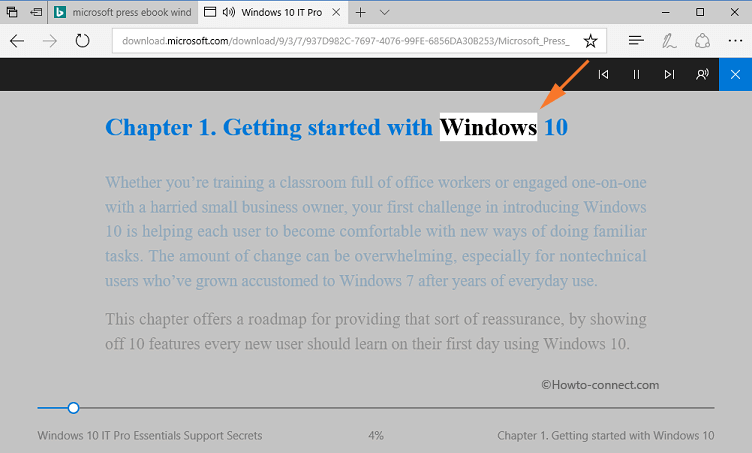
This week I viewed a short article with a video that focuses on the accessibility options available in the Microsoft Edge browser. This browser not only gives the reader the ability to assess a read-aloud option, but it also allows for a simplified reading format. Simplified reading allows the website to transform into a format that looks more like a book with enlarged words. The reader can also change the speed and voice with the read-aloud feature. Personally, I believe that these two great features of Microsoft Edge are great for the auditory learner, as well as learners with low vision. Do you think that the preferred settings in the readability feature can be saved? I guess I’ll have to do more research on this tool
The original article and video about the features of the Microsoft Edge browser can be found here: https://www.freetech4teachers.com/2018/09/how-to-use-read-aloud-option-in.html?utm_source=dlvr.it&utm_medium=twitter
Speaking of technology tools for students with low vision, NuEyes is cutting-edge technology. NuEyes are electronic smartglasses that look like sunglasses. These glasses allow for magnification, high contrast, and speech recognition that help people with low vision to see again. Even those who have been diagnosed as legally blind are able to have their sight restored while wearing NuEyes. I would like to use them in class for students who are suffering from low sight and struggle to complete regular class activities due to vision loss. As a teacher, one must be patient when a student requires the use of the smart glasses. They may need adjusting at times due to different situations and activities. Planning for extra time so that the student may adjust and prepare themselves for the activity should be considered.
For more information about NuEyes, please visit the following website: https://nueyes.com/
 Tackling Technology with Ms. LeBlanc